







Case Study
Streamlining the import of complex datasets
I led design for the Packs data import experience in close collaboration with Product, Customer Success, Sales, and Engineering. The goal was to redesign how users import and map complex reinsurance datasets at scale.
Packs is an analytical platform for reinsurance data. A critical part of the experience is helping users move large, complex datasets into the platform quickly and reliably, so they can spend more time analyzing data instead of preparing it.
Problem
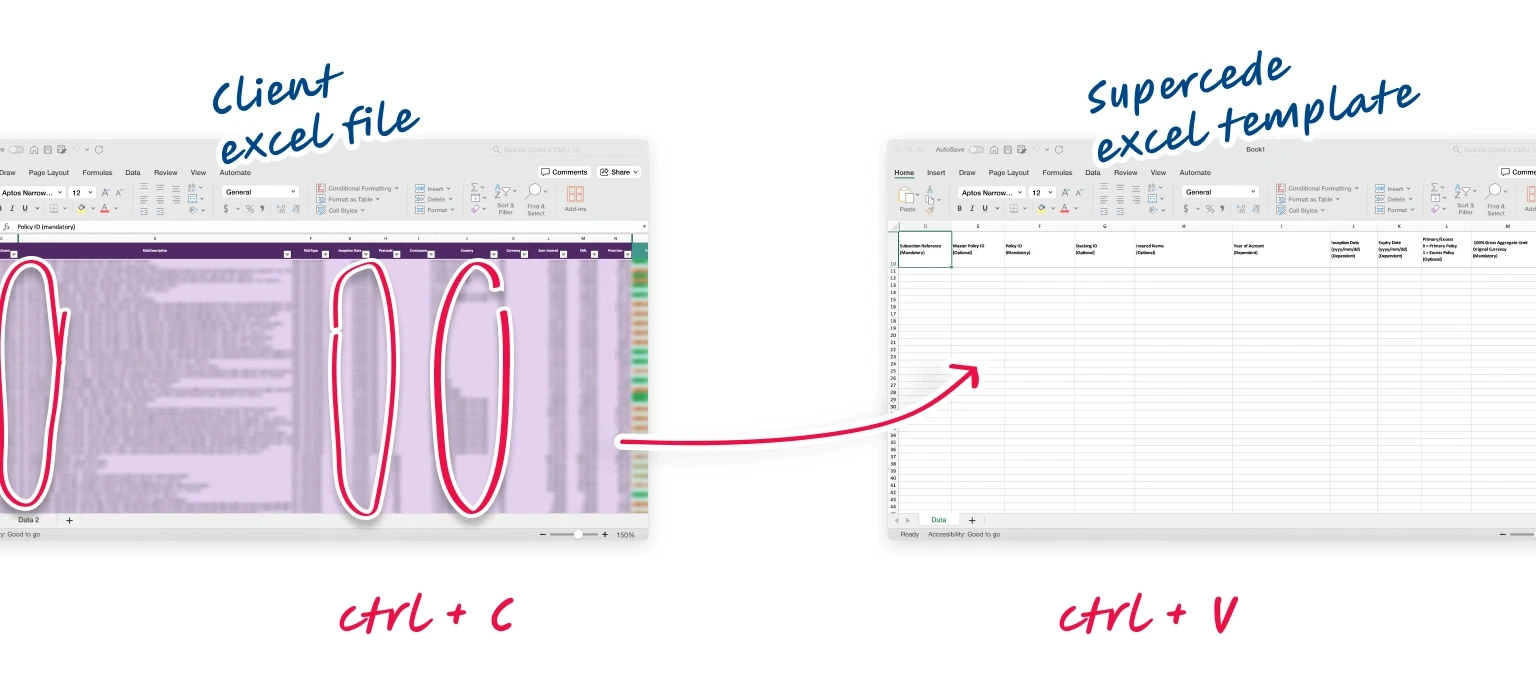
To prove the concept and gain traction, Supercede initially provided users with Excel templates to fill in with data and upload to the platform. This worked fine as a temporary solution but had some critical drawbacks to the clients and the business:
Upload limits
Handling large datasets was unmanageable due to limitations in GUI-based data transfer.
Manual mapping
Users had to manually remap data during every import.
Complicated matching
Varying data schemes and metric names among companies resulted in significant time spent on field matching and mapping.
Template version conflicts
Over time, the template structure changed causing conflicts when users attempted to upload data using outdated versions.
Excel vs Packs
Although Packs delivered valuable analytical insights, Excel remained the operational source of truth for most clients. As a result, Packs was perceived as one step in a fragmented workflow rather than a standalone platform
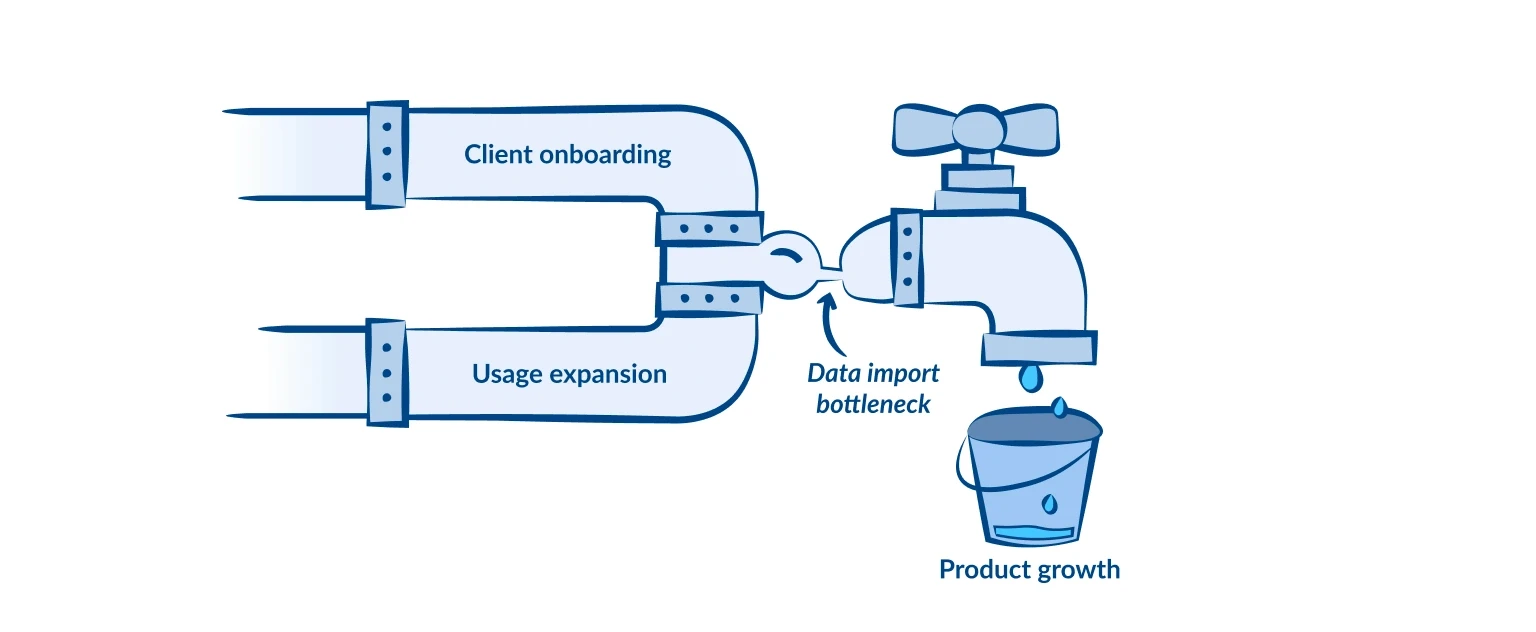
These issues increased the workload for customer support while intensifying customer dissatisfaction with the product and hindering clients' adoption and usage scalability of the Packs.
To summarise:
Challenge
The project goal was to redesign the data import experience to better support our clients’ business needs, as determined by >95% process completion rates and a >40% reduction in time on task.
Supercede’s ambitions were to enhance data import capabilities, increase adoption among existing enterprise clients, and give our sales department a strong selling point when demoing to the industry's top tiers operating on hundreds of datasets containing millions of rows.
Research and discovery
I had some educated guesses about where the import experience was failing users, but assumptions alone weren’t enough to move forward confidently. I decided to go through the research phase to fill the gaps: conduct stakeholder and user interviews, usability testing, and competitor analysis.
Interviewing stakeholders from the Customer Success and Sales departments allowed me to learn more about existing and potential clients’ expectations regarding data import. It provided KPIs to measure success from a business perspective.
I discovered that many users still need help with data import even after extensive onboarding. Additionally, the system's struggle with handling large datasets and its overall inflexibility were major concerns for potential clients.
User interviews (mostly with cedents, as they are an essential user type primarily involved in the data analysis) helped me learn about existing users’ experiences and pain points. I also ran unmoderated usability tests to see how existing users were trying to map and import the data.
Competitor analysis helped me learn from existing indirect competitors and evaluate how similar products approached large-scale data import. This allowed us to incorporate some existing patterns.
Uncovering Needs
After synthesizing the data into actionable insights, the key discoveries were:
The data import process should be separate from uploading data files on the platform (upload now, initiate import when required).
Users need a way to import custom data files to omit opening Excel and so bumping into GUI data transfer limits.
Users require a mechanism to save data mapping as config to make it available for subsequent imports.
Users needed the ability to create calculated fields using simple formulas.
Additionally, some clients are willing to import data using API (as I wasn't involved in the API project, it won't be covered in this case study).
Behavioral Metrics & KPIs
From the user perspective, we wanted to measure success by tracking the Task Success Rate, Time on Task, Error Rate, and the number of requests to customer support.While working on the project, we identified two additional metrics to track: the number of packs created per client with the updated experience and the ratio of template to non-template imports.
From a business perspective, we wanted to ensure we could track Customer Satisfaction and Effort Scores.
Possible solutions
We thought about three ways to tackle the issue:
Develop an Excel plugin for data import. The idea seems convenient, as users are familiar with the tool. However, it would deepen our reliance on Excel, making Packs less self-sufficient. Also, it wouldn't fully address the limitations of GUI-based data transfer.
Look into existing data import SaaS. We trialed existing products, but none met our technical requirements. We also aimed to control the product's development independently without being restricted by a third-party product roadmap. Additionally, there were some pricing concerns.
Create a custom data import solution. Even though it might take more time and resources, we decided to go for it because it could support product growth in the long run.
After choosing a custom importing experience, we moved from planning what to build to figuring out how to build it.
Data validation & cleansing
During the alignment session, we outlined the riskiest assumption: we might fail to deliver failure-proof data validation and cleansing, which is crucial for the entire idea. To tackle this, the Engineering team conducted a series of tests using real datasets to measure, enhance, and prove overall implementation and explore possible edge cases.
Scoping work
In discussions, we recognized that shipping the full experience at once wasn’t realistic. We decided to break the scope into smaller, independently valuable releases. While we understand that users need all the features to fully benefit from the new importing experience, we aimed to demonstrate to clients that the product is progressing.
First Iteration: Users can upload custom data files and map fields on the platform.
Second Iteration: Users can save mappings as presets and apply them to files with the same structure.
Third Iteration: Users can calculate data using formula operations and map these data to the fields.
User flows
Mapping the existing importing experience and the new flow helped align stakeholders around the future import experience
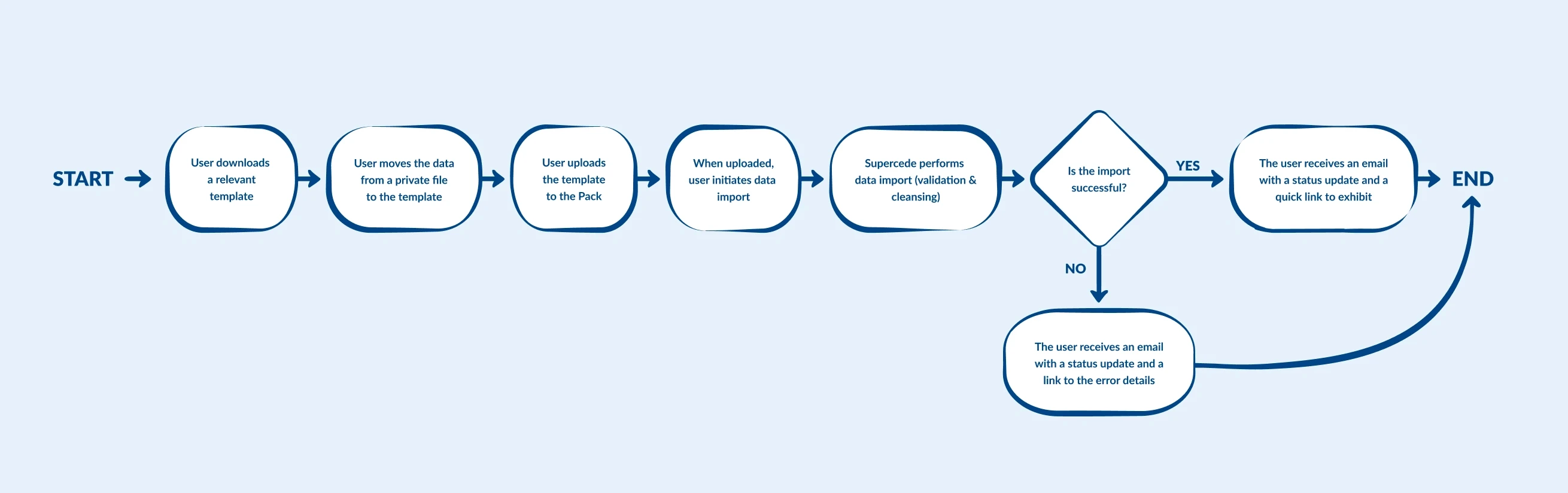
As-is
To-be

Wireframing
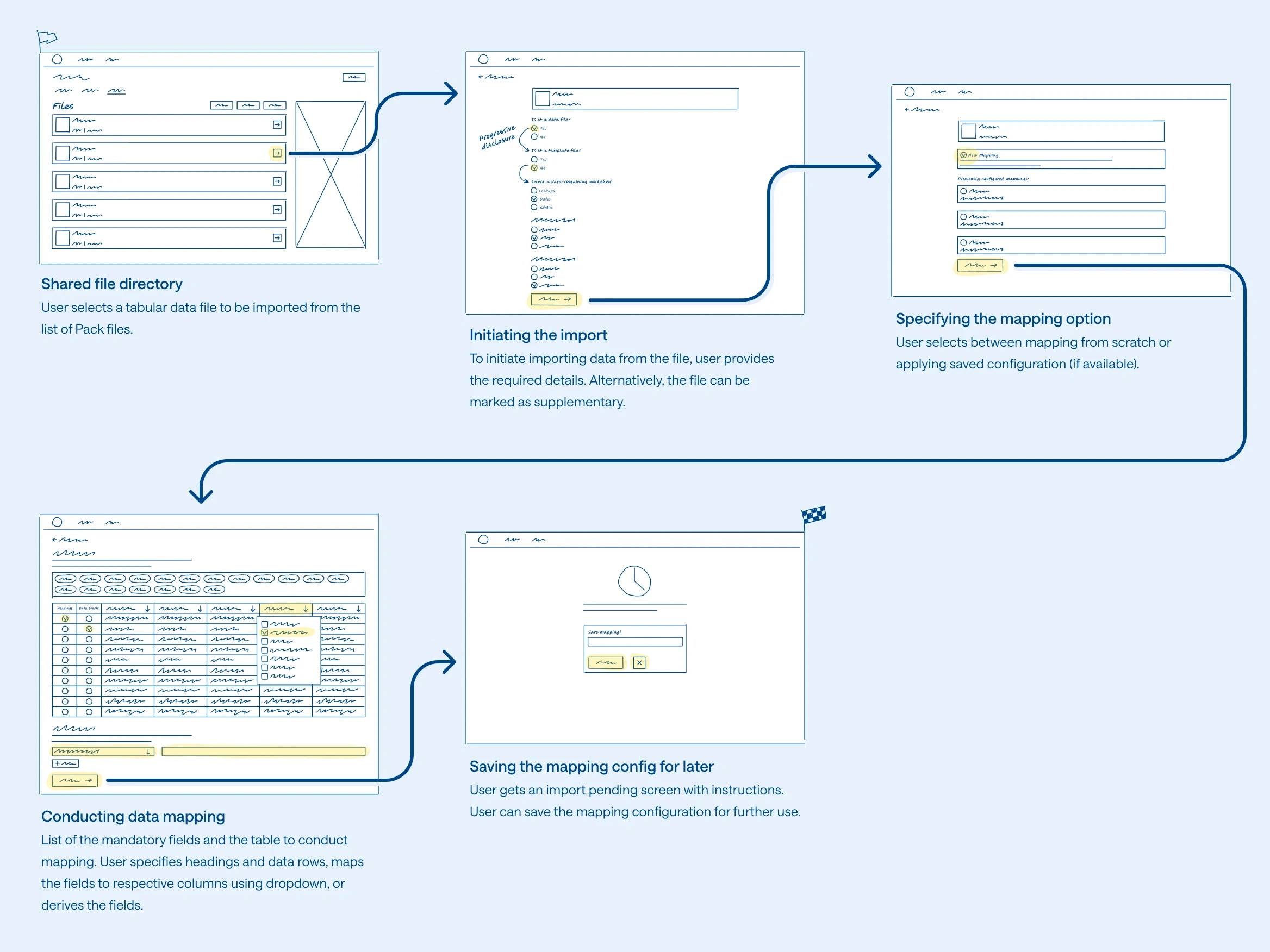
Early wireframes were used to test workflow structure, validate mapping interactions, and align stakeholders around how the importing experience should scale for enterprise datasets.
Prototyping
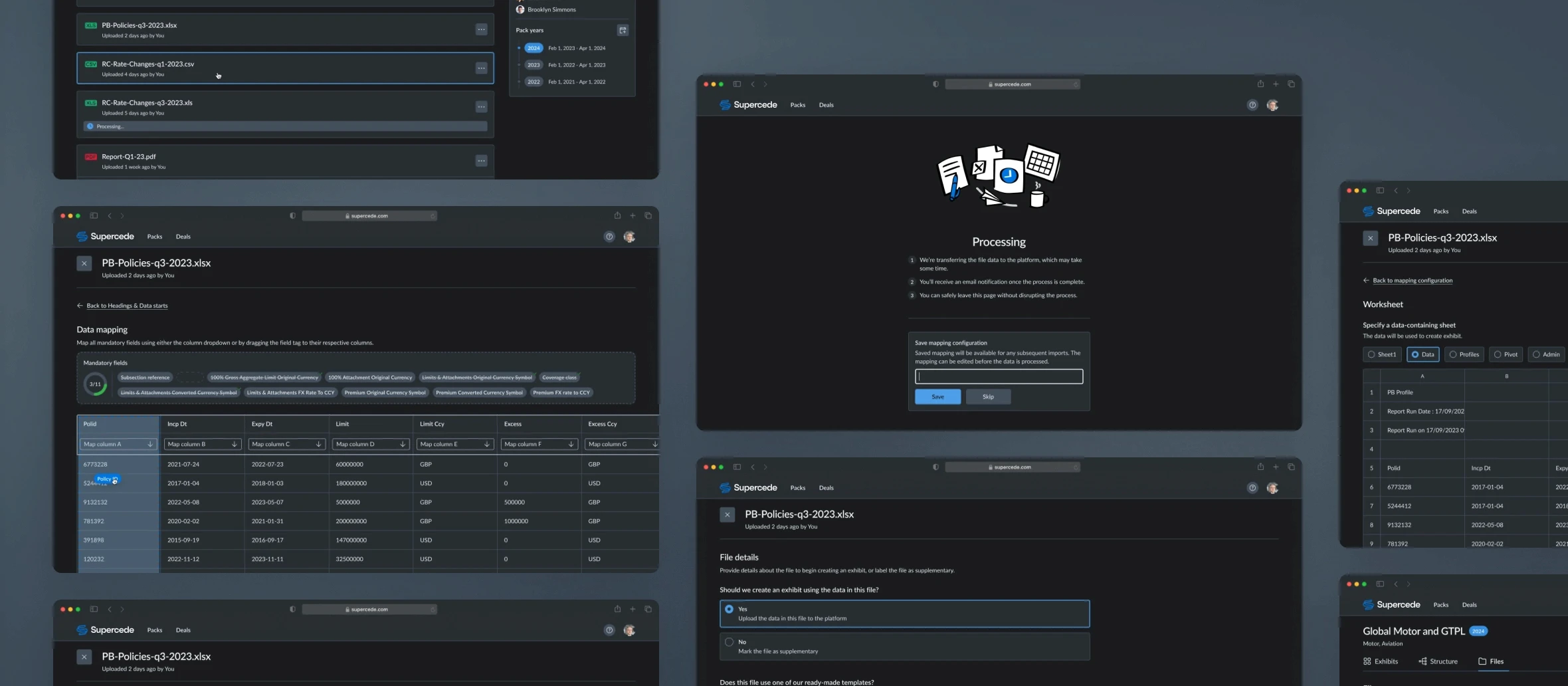
I developed an interactive prototype for the data import flow using the existing design system and interactive prototypes in Figma for early-stage usability testing.
Shared file directory
Previously, file upload and import were tightly coupled, forcing users to complete both actions at once. The redesigned workflow separated these tasks, allowing users to upload datasets in bulk and initiate imports later when needed.
Initiating the import
Before importing, users defined key dataset attributes such as file type, exhibit type, and subsection structure. Collecting this information upfront helped standardize the workflow and reduce import errors.
Specifying the mapping option
Users could either create mappings from scratch or apply previously saved mapping presets. Reusable configurations significantly reduced repetitive manual work for recurring imports.
Selecting the worksheet
For multi-sheet files, users selected the worksheet containing the relevant dataset. Previewing the sheet before import helped reduce selection mistakes and improve confidence during setup.
Choosing header and first data rows
Because uploaded files varied significantly in structure, users defined header and starting data rows before mapping fields.
Users mapped fields directly to dataset columns or created derived fields using simple formulas and fixed values. Suggested mappings, progress indicators, and drag-and-drop interactions helped reduce manual effort and improve completion speed for complex imports.
Saving the mapping config for later
After completing the mapping flow, users could save configurations as reusable presets for future imports.
Design system
I designed scalable components to support future iterations of the importing experience, including drag-and-drop interactions, embedded field states, and enhanced table behaviors.

Applying color variables, all designs are available in light and dark themes out of the box, improving flexibility and user experience.
Rollout and adoption
After a series of internal and alpha tests, we introduced the new data import feature as beta alongside template data import. Training and support documentation were prepared and published in the company’s knowledge base.
Impact
The redesign significantly improved the data import experience, receiving positive feedback from users. An incremental increase in CSAT and CES supported this. The new importing experience is now widely used by Supercede clients and has become one of the key factors in the product's long-term growth.
Success metrics:

A trial contract won with a big-big industry player

Reduced Time on Task

Completion Rate
A quarter after launch, non-template import continued to have a positive impact on the data import experience. Non-template import (vs template) increased significantly to 28%.
To comply with my non-disclosure agreement, I have omitted and obfuscated confidential information in this case study. All information in this case study is my own and does not necessarily reflect the views of Supercede.